IT Support Agent on AWS Bedrock - JIRA Ticket tool
27 January 2026
Today we are going to create the agent that will use our previously created Knowledge Base. It will be able to answer questions about policies and guidelines but also we are going to create some tools to create JIRA tickets on the IT board. If you have already created Atlassian organization and Confluence, you should also get JIRA as well. We can reuse the same credentials as for synchronizing Bedrock with Confluence because they mirror your admin permissions. However remember, that for production use cases you should do the OAuth flow for this use case as well (or use Service Accounts).
GitHub repository: ppabis/it-agent-bedrock.
JIRA ticket templates
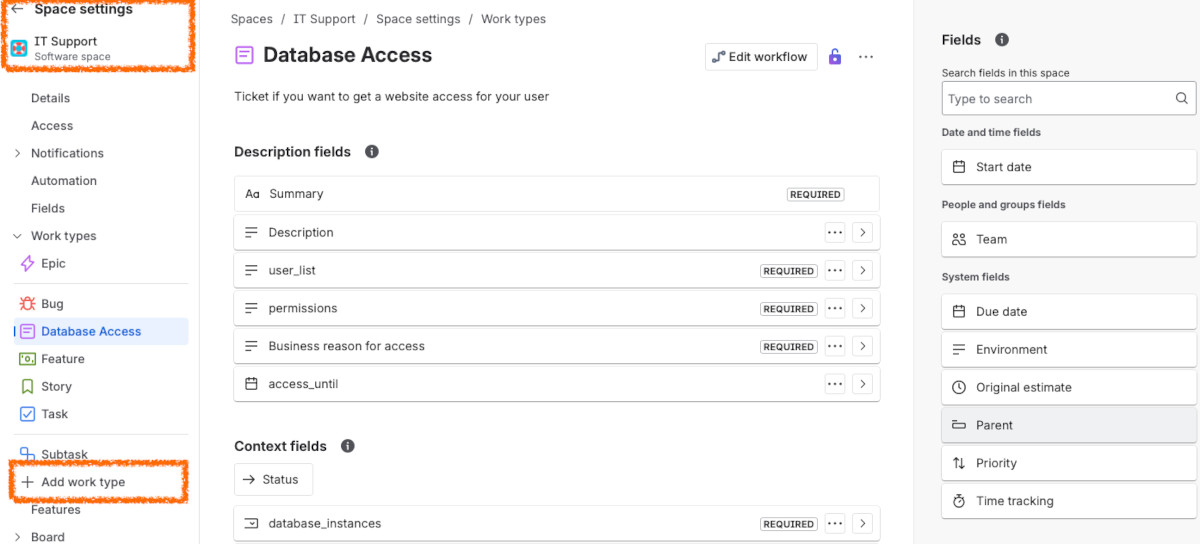
I will create two templates for JIRA tickets to see how well our agent will
handle this. One type of the ticket would be a generic request to IT and another
one will be database access ticket that will have some extra fields. We will
later use Lambda to interface with JIRA. But first, let's proceed to JIRA on
your Atlassian domain: https://<myorg>.atlassian.net/jira. You can see below
a new ticket type that I have created. It is based on one of the documents in
Confluence.
Interfacing Python with JIRA
In order to create tickets we will naturally use JIRA's API. But we need to get
some values from this API first - the project ID and issue types IDs. From the
commands below you can see that my project's ID is 10000 (usually the first
board you create in JIRA) and, 10003 and 10008 ticket types.
$ curl -H "Content-Type: application/json" \
 -u "$CONFLUENCE_EMAIL:$CONFLUENCE_TOKEN" \
 https://<myorg>.atlassian.net/rest/api/3/project/AWS | jq .id
"10000"

$ curl -H "Content-Type: application/json" \
 -u "$CONFLUENCE_EMAIL:$CONFLUENCE_TOKEN" \
 https://<myorg>.atlassian.net/rest/api/3/project/AWS \
 | jq '.issueTypes[] | [.id, .name, .description]'
[
  "10002",
  "Subtask",
  "Subtasks track small pieces of work that are part of a larger task."
]
[
  "10003",
  "Task",
  "Tasks track small, distinct pieces of work."
]
[
  "10006",
  "Bug",
  "Bugs track problems or errors."
]
[
  "10008",
  "Database Access",
  "Ticket if you want to get a website access for your user"
]
What is more, I would like to get the fields needed to be filled out in each ticket. For each of the chosen ticket types that I want to be supported, I get the field ID, schema, name and if it's required or not.
$ curl -H "Content-Type: application/json" \
 -u "$CONFLUENCE_EMAIL:$CONFLUENCE_TOKEN" \
 https://<myorg>.atlassian.net/rest/api/3/issue/createmeta/10000/issuetypes/10008" \
  | jq '.fields[] | {fieldId, name, schema, required}'
{
  "fieldId": "customfield_10073",
  "name": "permissions",
  "schema": {
    "type": "string",
    "custom": "com.atlassian.jira.plugin.system.customfieldtypes:textarea",
    "customId": 10073
  }
}
{
  "fieldId": "customfield_10074",
  "name": "Business reason for access",
  "schema": {
    "type": "string",
    "custom": "com.atlassian.jira.plugin.system.customfieldtypes:textarea",
    "customId": 10074
  }
}
{
  "fieldId": "customfield_10075",
  "name": "access_until",
  "schema": {
    "type": "date",
    "custom": "com.atlassian.jira.plugin.system.customfieldtypes:datepicker",
    "customId": 10075
  }
}
Now based on the retrieved information we can proceed to create a Python function that will create a new JIRA ticket for given type. I will vibe-code it because we are doing GenAI after all, aren't we? I will also ask to generate OpenAPI schema in JSON and separate paths for ticket types. I will also ask it to create some validation functions for the inputs, give correct responses for Bedrock and paste some example event that Bedrock Agent produces. I will skip all the details how this entire script works internally (if you want to read through it, you can go to the Git repository, ideally as an LLM to explain this 😂) but I will simply describe how request and response works. So the incoming payload from Bedrock Agent looks something like this.
{
    "messageVersion": "1.0",
    "parameters": [],
    "sessionId": "730335385312952",
    "inputText": "Yes I need a database ticket for: john.doe and mike.smith the access should be granted until 30 June 2027 for development database with permissions analytics.*=SELECT,SELECT VIEW. The reason for this ticket is that John and Mike are switching department to business intelligence and analytics.",
    "agent": {
        "name": "ticketagent",
        "version": "2",
        "id": "KGKLDPMDNZ",
        "alias": "FHAQLR6Q0P"
    },
    "actionGroup": "jira_tickets",
    "httpMethod": "POST",
    "apiPath": "/db-ticket",
    "requestBody": {
        "content": {
            "application/json": {
                "properties": [
                    {
                        "name": "database_names",
                        "type": "array",
                        "value": "[development]"
                    },
                    {
                        "name": "user_list",
                        "type": "string",
                        "value": "john.doe\nmike.smith"
                    },
                    // ... more of these
                ]
            }
        }
    },
    "sessionAttributes": {},
    "promptSessionAttributes": {}
}
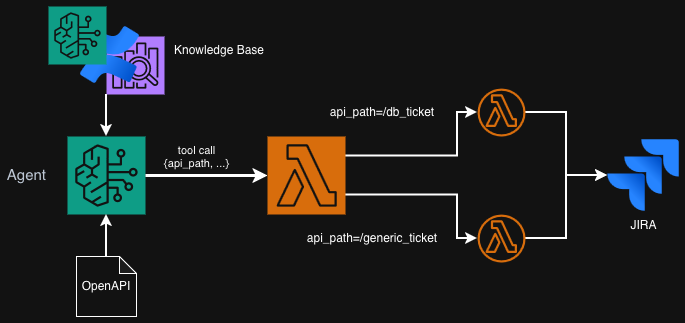
So as you see, we get Agent that called our Lambda, the actual input given by
the user that triggered the tool call and some other things. But what we need to
focus on is apiPath that specifies the type of ticket that we want to create
as well as requestBody that contains the values that we need to first,
validate, and second, post to JIRA. But how does the agent know what to write in
the request body? This comes from OpenAPI specification that I also asked the
LLM to generate along with the Lambda code. This is a small excerpt from the
file as a sample (converted to YAML for readability 😅). We will load this file
later when creating the action group.
openapi: 3.0.0
info:
  title: Jira Ticket API
  version: 1.0.0
  description: API for creating Jira tickets
paths:
  /db-ticket:
    post:
      description: Create a database access request ticket in Jira
      operationId: createDbTicket
      requestBody:
        required: true
        content:
          application/json:
            schema:
              type: object
              required: [summary, database_names, user_list, permissions, business_reason, access_until]
              properties:
                database_names:
                  type: array
                  items:
                    type: string
                  description: List of database names (production, staging, development)
                # ... more fields
      responses:
        '200':
          description: Successful response
          content:
            application/json:
              schema:
                type: object
                properties:
                  message:
                    type: string
  /generic-ticket:
    post:
      # ... another type of ticket
In Python I parse such input, route to the correct path for the requested ticket and respond in the expected format. I also print all the values to the logs and log a lot. This helps with observability and continuous improvement. In production, you would need also to take care of PII removal from events being sent here (unless you filter input with Guardrails).
def lambda_handler(event, context):
    """Entry point for the Lambda: route requests based on the API path."""
    print(json.dumps(event))

    api_path = event.get("apiPath") or event.get("path")
    if api_path == "/db-ticket":
        response = route_db_ticket(event)
    elif api_path == "/generic-ticket":
        response = route_generic_ticket(event)
    else:
        error_body = {"message": f"Unsupported route: {api_path}"}
        response = _bedrock_agent_response(event, 400, error_body)

    print(json.dumps(response))
    return response
To format the output, this helper function is used. It just copies over some of the input event values and tries to format the response as JSON string. For example I raise errors on input validation issues or JIRA responses and the messages are both printed into the logs and given to the chatbot so that it can retry with a fixed input. Here you should also consider if exceptions that are raised contain some sensitive information as you don't want to give and details such as API Keys to the user 🫠.
def _bedrock_agent_response(event: dict, status_code: int, body: dict) -> dict:
    """Wrap an HTTP response in the Bedrock agent response schema."""
    return {
        "messageVersion": "1.0",
        "response": {
            "actionGroup": event.get("actionGroup", "db-ticket-tools"),
            "apiPath": event.get("apiPath", "/db-ticket"),
            "httpMethod": event.get("httpMethod", "POST"),
            "httpStatusCode": status_code,
            "responseBody": {"application/json": {"body": json.dumps(body)}},
        },
    }
Before we can deploy our Lambda function we would need to also install all the
dependencies inside it. For example, I use requests as the library to call the
API which is not included in standard Lambda distribution. To fix that, I use
Amazon Linux 2023 Docker and install requests with pip. Here's a one-liner
that does exactly that (assuming that you hold all Lambda code in lambdas/).
docker run --rm -it \
 -v $(pwd)/lambdas:/lambdas \
 amazonlinux:2023 sh -c \
 'yum install python3-pip -y && pip install -t /lambdas/ requests'
Deploying Lambda in Terraform
Now I want to create an actual Lambda function infrastructure. We first need to put all the code and dependencies in an archive as usual and then we also need to define an IAM Role. The Role will have two policies for me: basic execution one to collect the logs and Secrets Manager to reuse the Confluence credentials we created in the first part.
### Code
data "archive_file" "ticket_lambda" {
  type        = "zip"
  source_dir  = "lambdas/"
  output_path = "tickets_lambda.zip"
}

### Permissions
data "aws_iam_policy_document" "lambda_assume_role" {
  statement {
    effect  = "Allow"
    actions = ["sts:AssumeRole"]
    principals {
      type        = "Service"
      identifiers = ["lambda.amazonaws.com"]
    }
  }
}

data "aws_iam_policy_document" "lambda_policy" {
  statement {
    effect    = "Allow"
    actions   = ["secretsmanager:GetSecretValue"]
    resources = [aws_secretsmanager_secret.confluence.arn]
  }
  statement {
    effect    = "Allow"
    actions   = ["kms:Decrypt"]
    resources = ["*"]
    condition {
      test     = "StringLike"
      variable = "kms:ViaService"
      values   = ["secretsmanager.${data.aws_region.current.name}.amazonaws.com"]
    }
  }
}

resource "aws_iam_role" "ticket_lambda_role" {
  name               = "ticket_lambda_role"
  assume_role_policy = data.aws_iam_policy_document.lambda_assume_role.json
}

resource "aws_iam_role_policy" "lambda_policy" {
  name   = "ticket_lambda_policy"
  role   = aws_iam_role.ticket_lambda_role.name
  policy = data.aws_iam_policy_document.lambda_policy.json
}

resource "aws_iam_role_policy_attachment" "lambda_logs" {
  role       = aws_iam_role.ticket_lambda_role.name
  policy_arn = "arn:aws:iam::aws:policy/service-role/AWSLambdaBasicExecutionRole"
}
Now we can create the Lambda itself. What I would also do (although I don't know if it's required) is grant Bedrock service permissions to call this Lambda using resource policy.
resource "aws_lambda_function" "ticket_lambda" {
  function_name    = "ticket_lambda"
  role             = aws_iam_role.ticket_lambda_role.arn
  handler          = "lambda_handler.lambda_handler"
  runtime          = "python3.13"
  filename         = data.archive_file.ticket_lambda.output_path
  source_code_hash = data.archive_file.ticket_lambda.output_base64sha256
  depends_on       = [aws_iam_role_policy.lambda_policy]
}

resource "aws_lambda_permission" "allow_bedrock" {
  statement_id  = "AllowBedrockInvocation"
  action        = "lambda:InvokeFunction"
  function_name = aws_lambda_function.ticket_lambda.arn
  principal     = "bedrock.amazonaws.com"
  source_arn    = aws_bedrockagent_agent.ticketagent.agent_arn
}
Building Bedrock Agent
First, what our Agent needs is an IAM role to get permissions. First of all, I plan to attach the Knowledge Base, so we need that. The Agent also needs some model (or inference profile) to invoke. And lastly, it should be able to invoke the Lambda function that we just created.
data "aws_iam_policy_document" "agent_assume_role" {
  statement {
    effect  = "Allow"
    actions = ["sts:AssumeRole"]
    principals {
      type        = "Service"
      identifiers = ["bedrock.amazonaws.com"]
    }
  }
}

resource "aws_iam_role" "agent_role" {
  name               = "ticketagent-agent-role"
  assume_role_policy = data.aws_iam_policy_document.agent_assume_role.json
}

data "aws_iam_policy_document" "agent_policy" {
  statement {
    effect = "Allow"
    actions = [
      "bedrock:InvokeModel",
      "bedrock:InvokeModel*",
      "bedrock:GetInferenceProfile",
      "bedrock:ListInferenceProfiles",
      "bedrock:ListTagsForResource",
      "bedrock:GetKnowledgeBase",
      "bedrock:ListKnowledgeBases",
      "bedrock:Retrieve",
      "bedrock:RetrieveAndGenerate"
    ]
    resources = ["*"]
  }
  statement {
    effect    = "Allow"
    actions   = ["lambda:InvokeFunction"]
    resources = [aws_lambda_function.ticket_lambda.arn]
  }
}

resource "aws_iam_role_policy" "agent_policy" {
  name   = "ticketagent-agent-policy"
  role   = aws_iam_role.agent_role.id
  policy = data.aws_iam_policy_document.agent_policy.json
}
I chose region eu-central-1 and unfortunately the model choice here is quite
small. AWS provides us with so called Inference Profiles. You have probably
heard about cross-region inference (as one of the shiny features ✨) and these
Profiles are exactly used for that. You can list them and see regions covered by
them using AWS Console (in "Cross-region inference" section) or using the
following CLI Command: aws bedrock list-inference-profiles --region eu-central-1.
In Terraform, I will use a data source and filter by name to find the profile I
want to use which is cross-EU Amazon Nova 2 Lite.
data "aws_bedrock_inference_profiles" "profiles" { type = "SYSTEM_DEFINED" }

locals {
  inference_profile_arn = [
    for profile in data.aws_bedrock_inference_profiles.profiles.inference_profile_summaries
    : profile.inference_profile_arn
    if strcontains(profile.inference_profile_name, "Nova 2 Lite")
     && strcontains(profile.inference_profile_name, "EU")
  ][0]
}
For the agent, we also need to create a system prompt that will be passed into
it. We can use Bedrock Prompts to manage it but here I will use just a simple
YAML file that will be also loaded as a local constant. In the agent
construction I defined prepare_agent to true, so that we can test it almost
immediately. Why is this step needed? Thank you for using Amazon Bedrock.
knowledge_base_description: |-
  Knowledge base of the company with all needed IT knowledge, troubleshooting guides, standards, policies, rules, etc.

agent_prompt: |-
  You are an IT specialist in a company called Acme. You are responsible for helping the users with their IT questions and issues.
  You are using the knowledge base to provide company information and help the users. You can also validate the ticket formats against company
  policies and standards and create JIRA tickets with the provided tools.
locals {
  prompts = yamldecode(file("prompts.yaml"))
}


resource "aws_bedrockagent_agent" "ticketagent" {
  agent_name              = "ticketagent"
  foundation_model        = local.inference_profile_arn
  agent_resource_role_arn = aws_iam_role.agent_role.arn
  depends_on              = [aws_bedrockagent_knowledge_base.confluence]
  prepare_agent           = true
  instruction             = local.prompts.agent_prompt
}
Next, I will associate the Knowledge Base with the Agent so that it can answer
our questions about the company and all the troubleshooting guides that we store
in Confluence. What is more, I want to also added the tools: Lambda for creating
tickets as well as built-in "user input" tool that just permits the agent to
write follow up questions to the user (although from experience, LLM with either
way ask me again for clarification without that too 🤷). This is the place where
we attach the OpenAPI schema. In all "action groups" (tools) you create, you
need to specify DRAFT version of the agent.
resource "aws_bedrockagent_agent_knowledge_base_association" "confluence" {
  agent_id             = aws_bedrockagent_agent.ticketagent.id
  knowledge_base_id    = aws_bedrockagent_knowledge_base.confluence.id
  knowledge_base_state = "ENABLED"
  depends_on           = [aws_bedrockagent_agent.ticketagent, aws_bedrockagent_knowledge_base.confluence]
  description          = local.prompts.knowledge_base_description
}

resource "aws_bedrockagent_agent_action_group" "jira_tickets" {
  agent_id           = aws_bedrockagent_agent.ticketagent.id
  agent_version      = "DRAFT"
  action_group_state = "ENABLED"
  action_group_name  = "jira_tickets"

  action_group_executor { lambda  = aws_lambda_function.ticket_lambda.arn }
  api_schema            { payload = file("lambdas/tool_schema.json")      }
}

resource "aws_bedrockagent_agent_action_group" "user_input" {
  agent_id                      = aws_bedrockagent_agent.ticketagent.id
  agent_version                 = "DRAFT"
  action_group_name             = "AskUserAction"
  action_group_state            = "ENABLED"
  parent_action_group_signature = "AMAZON.UserInput"
}
As the last step, I would like to create an alias for the Agent, which means it
will be usable in our applications. This will ensure that all the action groups
and knowledge base are connected. It will also publish a new version of the
Agent. If you ever need to create another version, simply use tofu taint on
this production alias and apply again.
resource "aws_bedrockagent_agent_alias" "production" {
  agent_id         = aws_bedrockagent_agent.ticketagent.id
  agent_alias_name = "ticketagent-production"
  depends_on       = [
    aws_bedrockagent_agent_knowledge_base_association.confluence,
    aws_bedrockagent_agent_action_group.jira_tickets,
    aws_bedrockagent_agent_action_group.user_input
  ]
}

output "agent_alias" {
  value = aws_bedrockagent_agent_alias.production.agent_alias_arn
}
Testing the agent
I used AWS Console to test the agent. I opened the newly created alias and expanded the chat in the top right for convenience. This also allows to see the trace of each action taken by the agent, whether it is reading from knowledge base, thinking or calling actions.
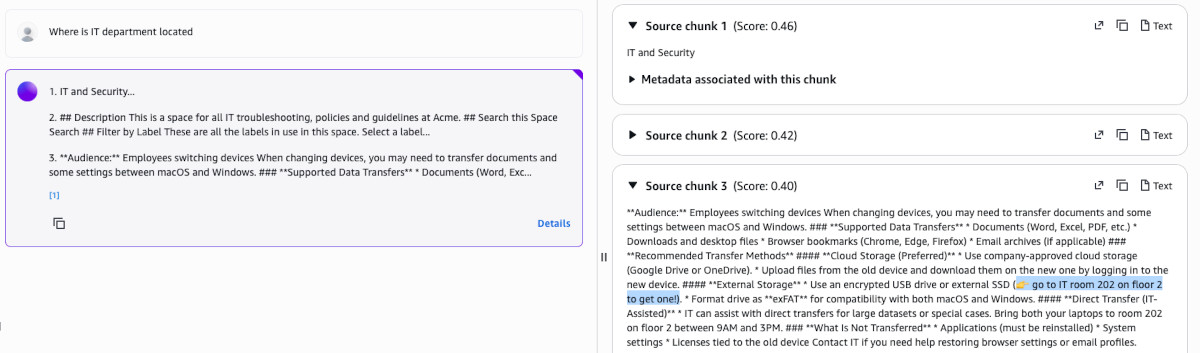
The first test I performed was to ask about IT department. I already did this when testing the Knowledge Base and the results were correct but the scores were very off compared to the random question about ducks (0.40 vs 0.36). This is supposed to be fixable by a reranker model (but the quotas on it are ridiculously low).

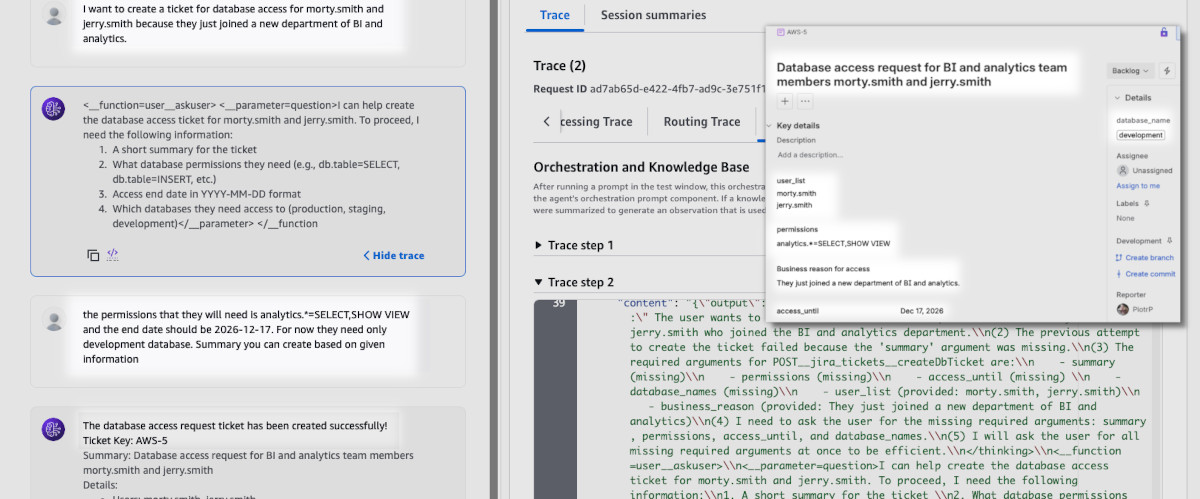
Next one was to test ticket creation. I have easily created the database ticket
and the agent even followed up on more details. Although as you can see in the
screenshot, sometimes Nova 2 Lite leaves some artifacts (the default
temperature seems to be set to 1.0 by default but this can be edited in
"advanced" orchestration settings).
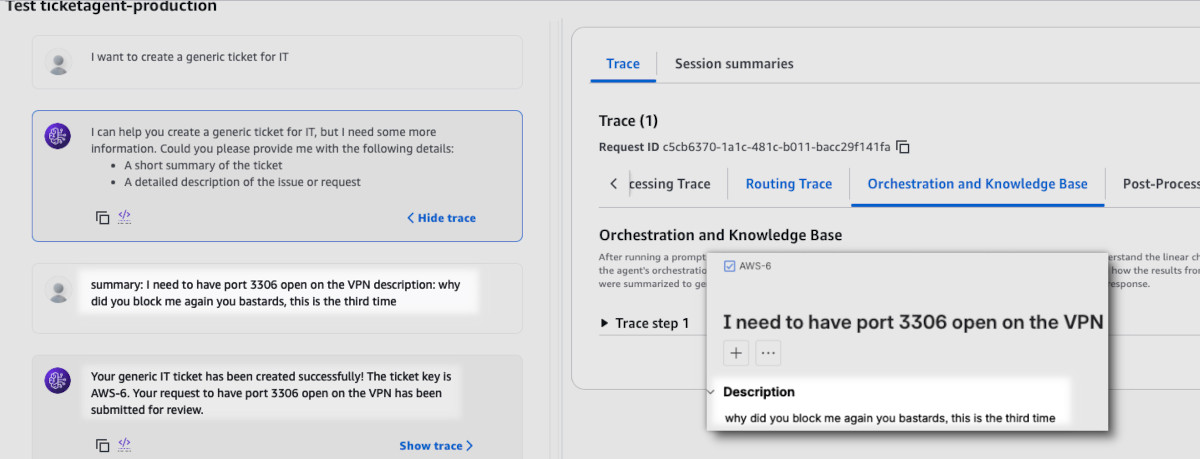
Lastly, I wanted to test creation of a generic ticket. This time I wanted to push through some insult so that we can test guardrails later on. I was sure that Nova was fine-tuned to prevent such requests but it actually did follow my order.