AWS NAT Gateway: upgrading from one-AZ to multi-AZ or regional - downtime
08 June 2026
Whenever you start a project and there's not much traffic going on, you are likely to set up a single NAT Gateway to provide connectivity to the outside world for your instances in private subnets. When the project grows, and the traffic increases, costs for cross-AZ traffic can nudge you towards providing separate NAT route for each individual availability zone. We had this problem recently at AY, and were looking for solutions. Is it better to expand by adding to additional zonal NAT Gateway and maintain multiple route tables? Or is it reasonable to just create a new Regional NAT Gateway that would simplify some of the maintenance? What solution provides the least downtime and hiccups along the way? We are going to find out in today's post.
The critical application 💥
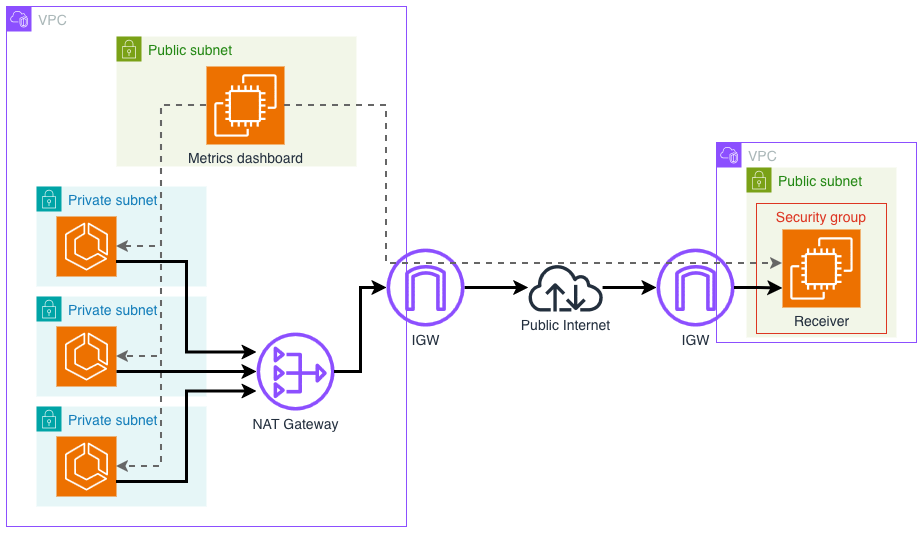
I vibe coded a simple application that would test the potential downtime and connections that break. I asked Codex to create two Go apps - one receiver that will listen for connections in some separate arbitrary VPC (I used the default VPC provided with the account and region) and another app that will be the transmitter in multiple availability zones, behind a NAT in a new VPC. Each of these apps will track successful and dropped connections count as well as how many packets were delivered and how many were lost. Each TCP connection will be kept open for 20 seconds and packets will flow every 100ms or so. Each packet will contain some basic data such as task ID and availability zone name.
Another application that will run in the public subnet of the new VPC (for simplicity) will gather metrics from the transmitters in private subnets and the receiver in the other VPC, and display a simple dashboard with statistics. The diagram below shows an application-level concept how it should look like.
Single-AZ NAT - the initial state 1️⃣
On the diagram below you should see the VPC setup I have created for the application. As mentioned previously, the transmitters will run in private subnets and be scaled on ECS Fargate. Their outbound connectivity will be provided by a single-zone NAT Gateway with static Elastic IP that will be allowed on receiver's security group. In another VPC the receiver that is exposed to the public Internet, also with static Elastic IP, will listen for incoming connections, send ACKs, and track interrupted connections and packets lost. I also assume that the receiver is not just a public facing service but requires some kind of allowlist for the CIDRs that can access it.
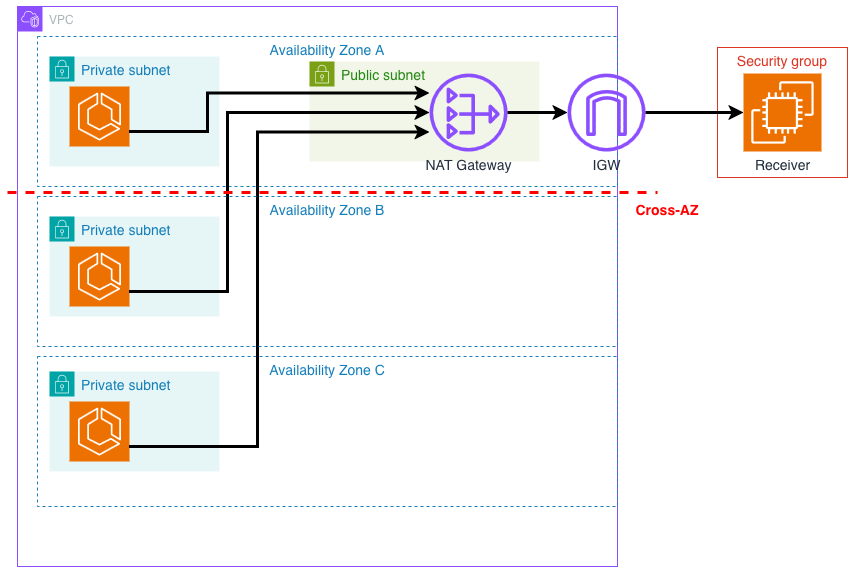
A metric scraping application and dashboard will use a different HTTP port and a separate path to be independent from the NAT and the TCP flow. It will have a static Elastic IP to be easily allowed into receiver's security group and skip the NAT for Internet connectivity. As it resides in the same VPC as the transmitters, access to private subnet is straightforward.
Creating the infrastructure 🧱
Based on how I structured the project, I need to build individual components in
a specific order, so that OpenTofu doesn't complain about the unknowns in the
graph. First I create Elastic IPs as they will be needed in the for_each block
in the security group. Next I want to create just the receiver - it should be
ready before the transmitters so that no connections are unnecessarily failed.
Next is the time for the transmitters, the dashboard and rest of the VPC.
tofu init
tofu apply -target aws_eip.dashboard
tofu apply -target aws_eip.nat
tofu apply -target module.receiver
tofu apply -target module.transmitter
tofu apply
The most important parts of our setup that we should focus on are the Elastic IP of the NAT Gateway, the NAT Gateway itself and the route tables of the private subnets. I will list them below so that you can take a look how they are currently structured.
resource "aws_eip" "nat" {
  domain = "vpc"
  tags   = { Name = "NAT-IP-eu-west-1a" }
}

resource "aws_nat_gateway" "main" {
  allocation_id = aws_eip.nat.id
  subnet_id     = aws_subnet.public[0].id
  tags          = { Name = "NAT-eu-west-1a" }
}

// We define one route table for private subnets that just goes to the single NAT Gateway
resource "aws_route_table" "private" {
  vpc_id = aws_vpc.main.id
  tags   = { Name = "RTB-Private" }
  route {
    cidr_block     = "0.0.0.0/0"
    nat_gateway_id = aws_nat_gateway.main.id
  }
}

// We associate this single route table with all three subnets in 3 AZs
resource "aws_route_table_association" "private" {
  count = local.subnet_count

  subnet_id      = aws_subnet.private[count.index].id
  route_table_id = aws_route_table.private.id
}
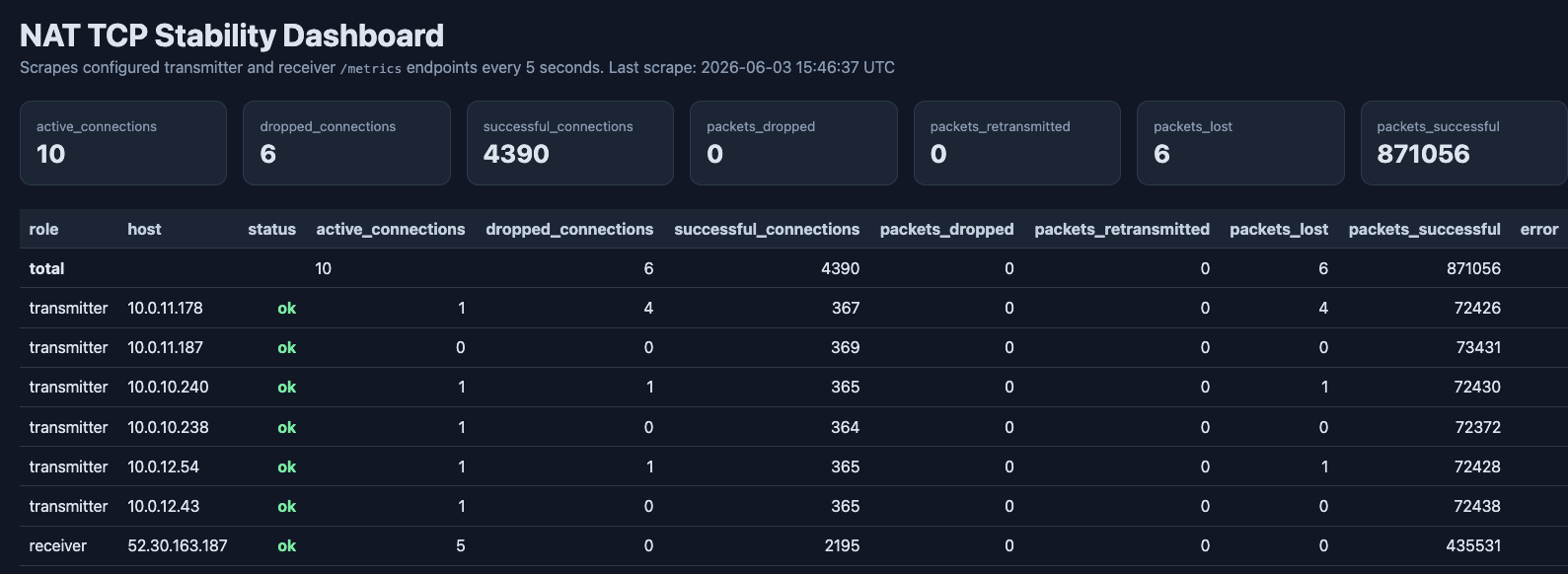
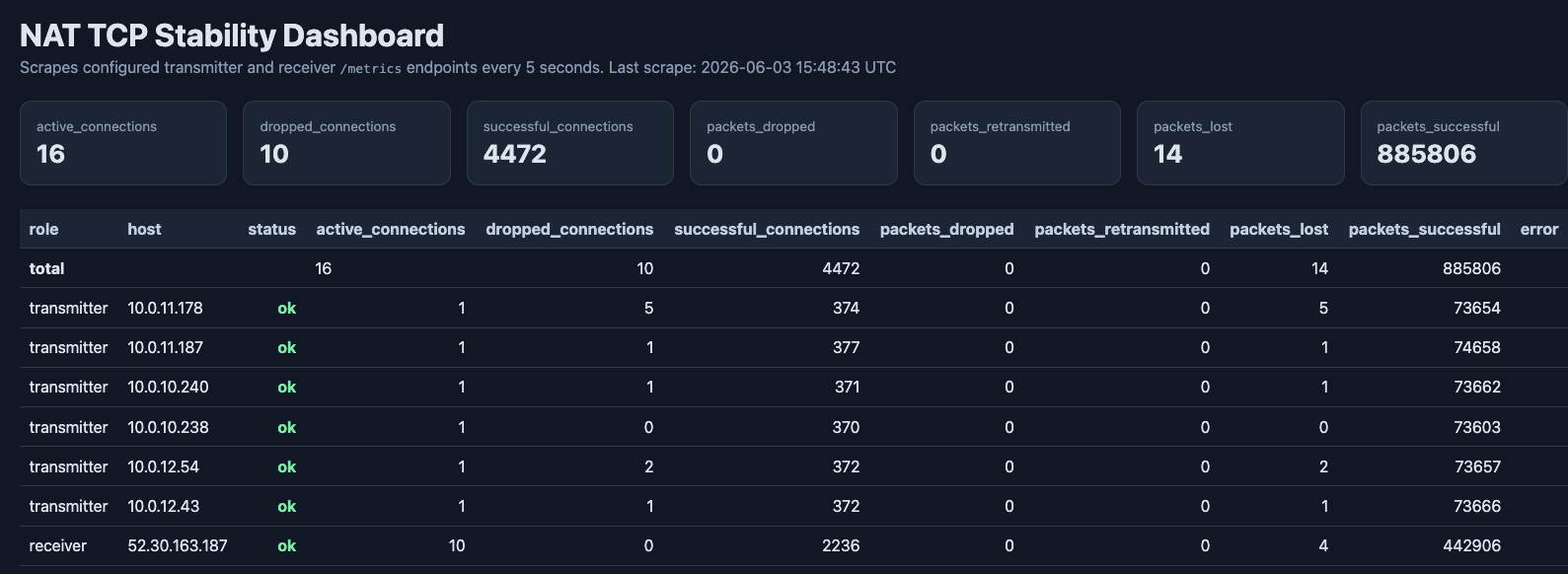
Startup script of the dashboard has a script to get all the tasks in the ECS Service and pass them further as a list. The dashboard queries each individual ECS task for metrics. After a while, I took a screenshot of the current state where no infra was touched. As you can see, there are still some packets lost - this is the nature of the Internet.
Switching to 3-NAT setup 3️⃣
Now, we are going to switch to a traditional multi-NAT Gateway setup. To make it as seamless as possible and not cause too much downtime, I will first define two Elastic IPs and add them to the security group of the receiver. This way we will have the path open before we start sending packets through the NAT. This two step process is only needed if you rely on a whitelist strategy on the service you are going to reach out to, maybe you have a third party you need to share your public IP ranges with.
I will simply convert the aws_eip resource to a count of three. Terraform is
smart enough to figure out that the current EIP should be moved to
aws_eip.nat[0]. I will also change the ingress rule in the receiver to perform
also per count of each aws_eip.
resource "aws_eip" "nat" {
  count  = local.subnet_count
  domain = "vpc"
  tags   = { Name = "NAT-IP-${local.az_names[count.index]}" }
}
// Also update the association on existing NAT gateway, simply add `[0]`
resource "aws_vpc_security_group_ingress_rule" "receiver_tcp_from_nat" {
  count = length(aws_eip.nat)

  security_group_id = aws_security_group.receiver_instance.id
  description       = "Receiver TCP packets from NAT Gateway public IP"

  cidr_ipv4   = "${aws_eip.nat[count.index].public_ip}/32"
  from_port   = 9090
  to_port     = 9090
  ip_protocol = "tcp"
}
Now after applying the path is open for our reserved IPs, even though we don't send any traffic yet. This is the time to create two extra NAT Gateway as well as route tables for each individual subnet. They should also be placed in public subnet for corresponding AZ.
resource "aws_nat_gateway" "main" {
  count = local.subnet_count

  allocation_id = aws_eip.nat[count.index].id
  subnet_id     = aws_subnet.public[count.index].id // Also changes to place it in required AZ
  tags          = { Name = "NAT-${local.az_names[count.index]}" }
}

// Will create two new route tables
resource "aws_route_table" "private" {
  count = local.subnet_count

  vpc_id = aws_vpc.main.id
  tags   = { Name = "RTB-Private-${local.az_names[count.index]}" }
  route {
    cidr_block     = "0.0.0.0/0"
    nat_gateway_id = aws_nat_gateway.main[count.index].id
  }
}

// Will associate second and third subnet with new route tables
resource "aws_route_table_association" "private" {
  count = local.subnet_count

  subnet_id      = aws_subnet.private[count.index].id
  route_table_id = aws_route_table.private[count.index].id
}
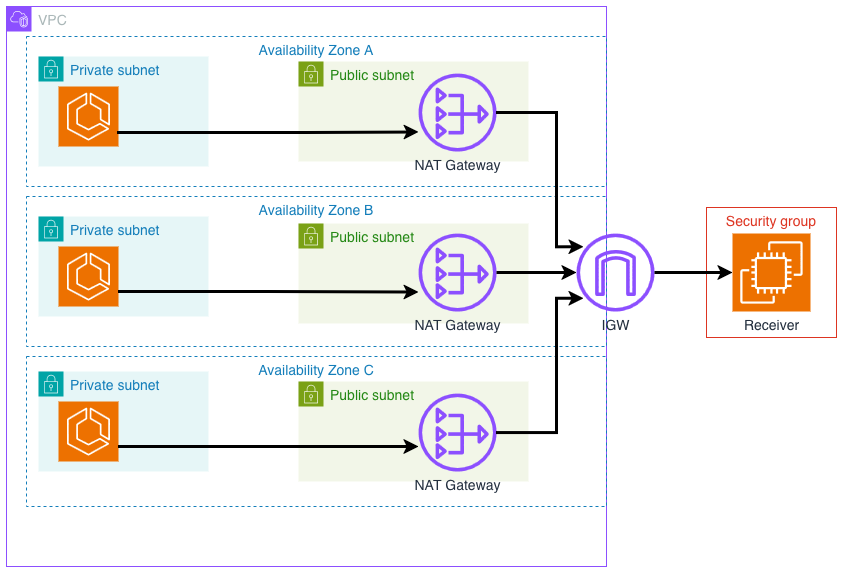
The current setup should look like on the diagram below. As you can see in the statistics now, some of the connections were closed and some packets were lost. Even though we were just expanding the network with new resources, backward path for some of the packets was interrupted.
Switching to Regional NAT in auto-mode 🌍
Regional NAT has two versions: auto-mode where AWS just provides IPs for you and manual mode where you explicitly choose Elastic IPs like with classic NAT Gateway. Unfortunately there's no shared IP option at the moment (like in GCP and Azure). I will first try the auto-mode.
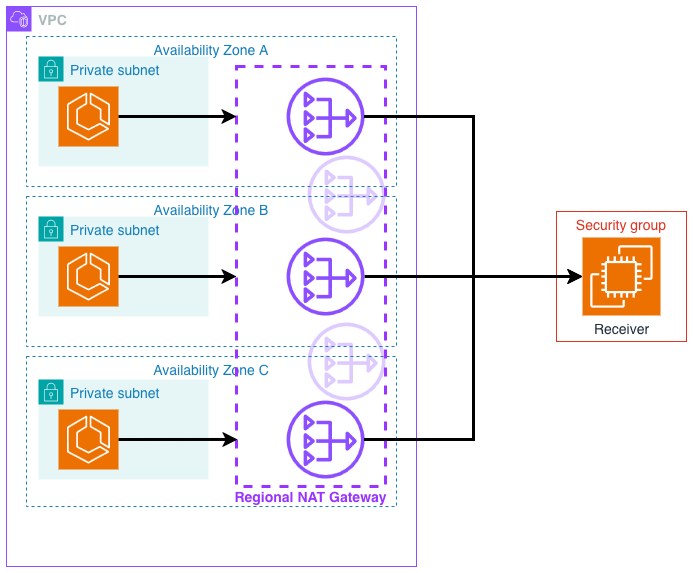
Assume that we roll back the 3-NAT setup and we are back to original single-AZ single-NAT network. Converting the zonal NAT to regional one is equal to destroy and create, which will definitely be a downtime. Thus I will first create a new resource of the regional NAT Gateway.
resource "aws_nat_gateway" "regional_auto" {
  availability_mode = "regional"
  vpc_id            = aws_vpc.main.id
  tags              = { Name = "NAT-regional-auto" }
}
Apply. Now as the IPs can be determined, I will allow them on the receiver's SG. Here I am doing a risky thing ⚠️. Because Regional NAT can auto expand and provide more IPs (due to port exhaustion), more IPs can appear and be blocked by the service. Similarly when it contracts during low traffic, it's not guaranteed that currently whitelisted IP will be preserved. I assume that the traffic from my application is low and, because workloads are in each AZ, the Gateway will just stay in the same shape throughout its lifetime.
locals {
  regional_ips = aws_nat_gateway.regional_auto.regional_nat_gateway_address[*].public_ip
}

resource "aws_vpc_security_group_ingress_rule" "regional_nat_ip" {
  count = length(local.regional_ips)

  security_group_id = aws_security_group.receiver_instance.id
  description       = "Receiver TCP packets from NAT Gateway public IP"

  cidr_ipv4   = "${local.regional_ips[count.index]}/32"
  from_port   = 9090
  to_port     = 9090
  ip_protocol = "tcp"
}
Now as the path is clear for the traffic to go, I can switch the route table to the new NAT Gateway. I apply new routes before deleting the old gateway as Terraform likes to destroy things first before doing changes, even when there's no more dependency 🙂...
resource "aws_route_table" "private" {
  vpc_id = aws_vpc.main.id
  tags   = { Name = "RTB-Private" }
  route {
    cidr_block     = "0.0.0.0/0"
    nat_gateway_id = aws_nat_gateway.regional_auto.id    // 👈 Changed
  }
}
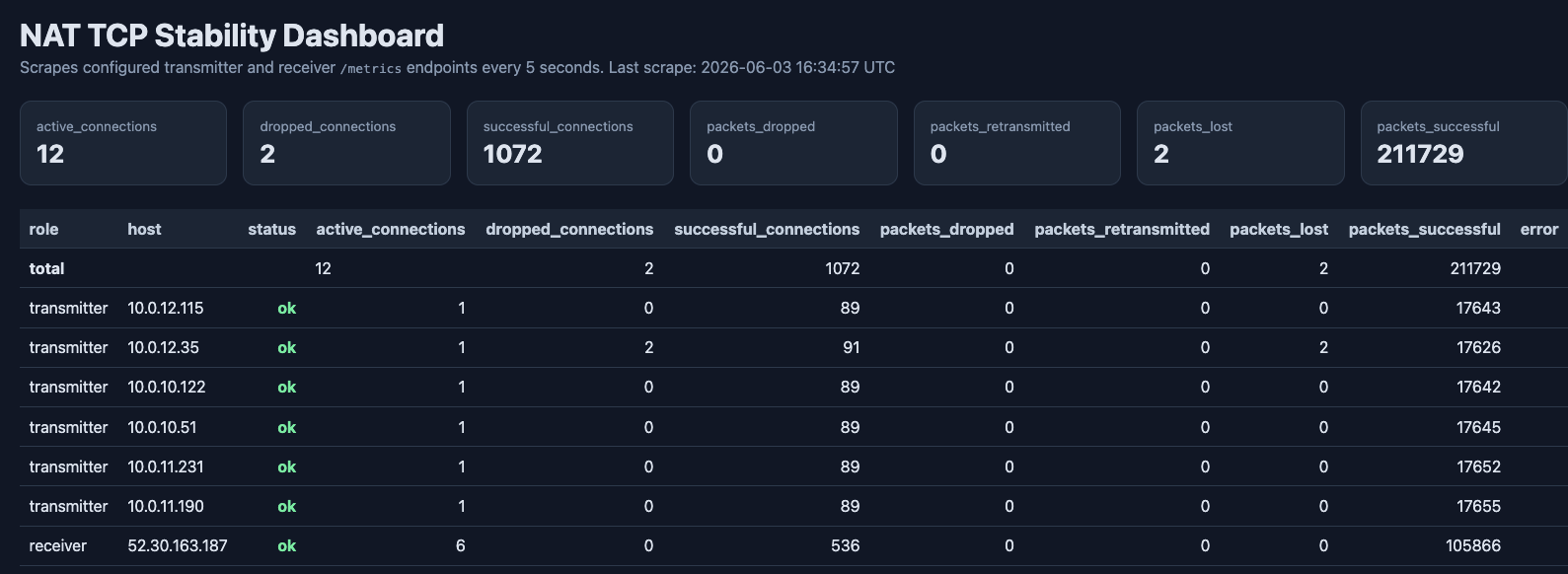
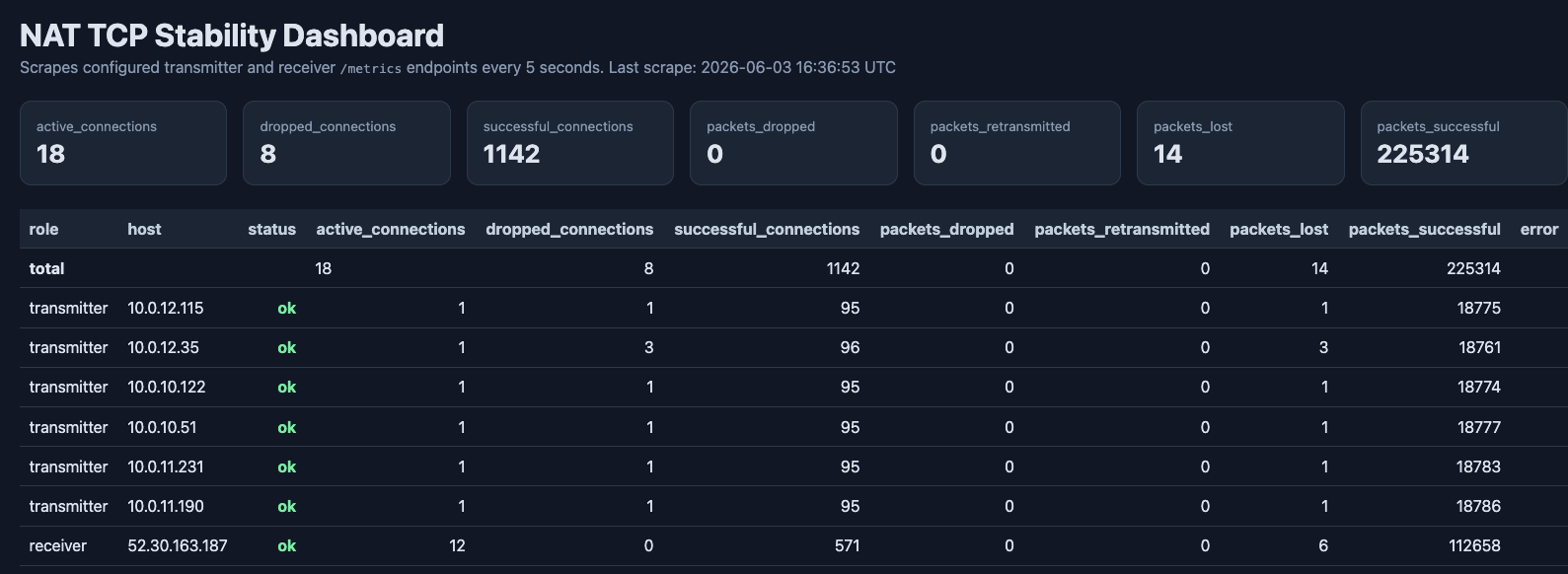
Only now we can clean up by deleting the old zonal NAT, freeing the Elastic IP and remembering to block it on receiver's security group. Below are the metrics when switching from single-AZ NAT to regional NAT. As you can see, the packet drop rate is very similar. The first metrics are the baseline before the switch when we are still using single NAT and second snapshot shows metrics after changing the route.
Regional NAT in manual mode 🔧
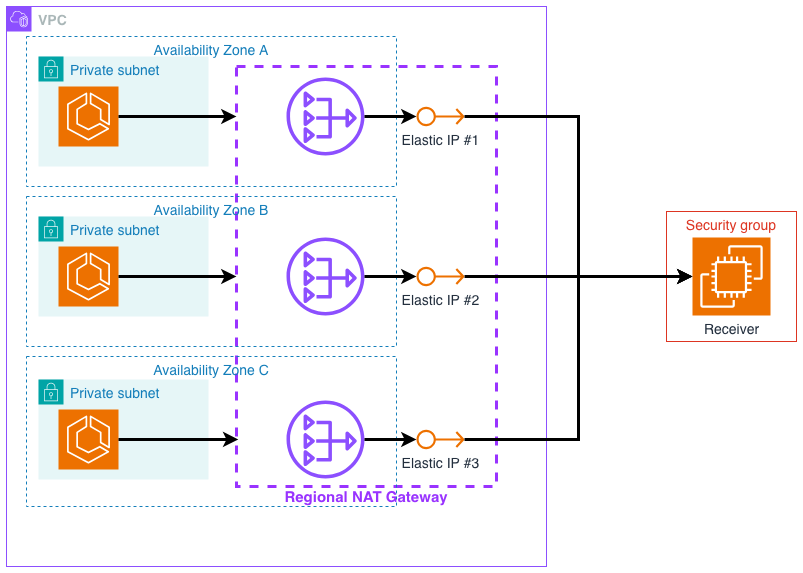
So what if you want to retain control over the IPs of the Regional NAT? You can also assign IPs to it when you choose the manual mode. In that case you lose the automatic contraction/expansion ability and the NAT Gateway just resides statically in the chosen availability zones. If you assign one Elastic IP to it, it will behave the same way as the single-AZ zonal one. However, I want to expand to all three AZs while retaining the Elastic IP have already registered, so here's the plan:
- I will register two new Elastic IPs and add them to the receiver's security group.
- I will create a regional NAT Gateway and assign these two IPs to the two
other zones where there's no zonal GW (let's assume
eu-west-1a). - Now the routes will be switched to the new gateway. Traffic from instances in
eu-west-1awill be cross-AZ and choose a random path. The other AZs will be served by respective Regional NAT presence. - Because zonal NAT is unused, I'm going to delete and free the existing Elastic IP.
- I will assign the old IP to
eu-west-1aconfig of the new gateway.
There's also an alternative way where you simply register three IPs, whitelist them, switch route and then clean up by removing zonal NAT GW, old Elastic IP and the entry in the security group. However, I'm assuming one thing - that have to contact a third party to allow our CIDRs to access their service and I want to keep this communication to the minimum (one email for adding two IPs vs. two emails for adding three IPs and another for removal of the old one).
I will do just that. The Elastic IP creation and addition to the security group will look exactly like we did this for 3-NAT setup.
resource "aws_eip" "nat" {
  count  = local.subnet_count
  domain = "vpc"
  tags   = { Name = "NAT-IP-${local.az_names[count.index]}" }
}
// Also update the association on existing NAT gateway, simply add `[0]`
// Let's pretend this is an e-mail 😅
resource "aws_vpc_security_group_ingress_rule" "receiver_tcp_from_nat" {
  count = length(aws_eip.nat)

  security_group_id = aws_security_group.receiver_instance.id
  description       = "Receiver TCP packets from NAT Gateway public IP"

  cidr_ipv4   = "${aws_eip.nat[count.index].public_ip}/32"
  from_port   = 9090
  to_port     = 9090
  ip_protocol = "tcp"
}
Now I can create a new regional NAT gateway where I assign two of the IPs in two other availability zones. I will also move the route already as it will be triggered after its creation, and observe what is happening on the dashboard.
resource "aws_nat_gateway" "regional" {
  vpc_id            = aws_vpc.main.id
  availability_mode = "regional"
  tags              = { Name = "NAT-regional-manual" }

  availability_zone_address {
    allocation_ids    = [aws_eip.nat[1].id]
    availability_zone = local.azs[1]
  }

  availability_zone_address {
    allocation_ids    = [aws_eip.nat[2].id]
    availability_zone = local.azs[2]
  }
}
resource "aws_route_table" "private" {
  vpc_id = aws_vpc.main.id
  tags   = { Name = "RTB-Private" }
  route {
    cidr_block     = "0.0.0.0/0"
    nat_gateway_id = aws_nat_gateway.regional.id    // 👈 Changed
  }
}
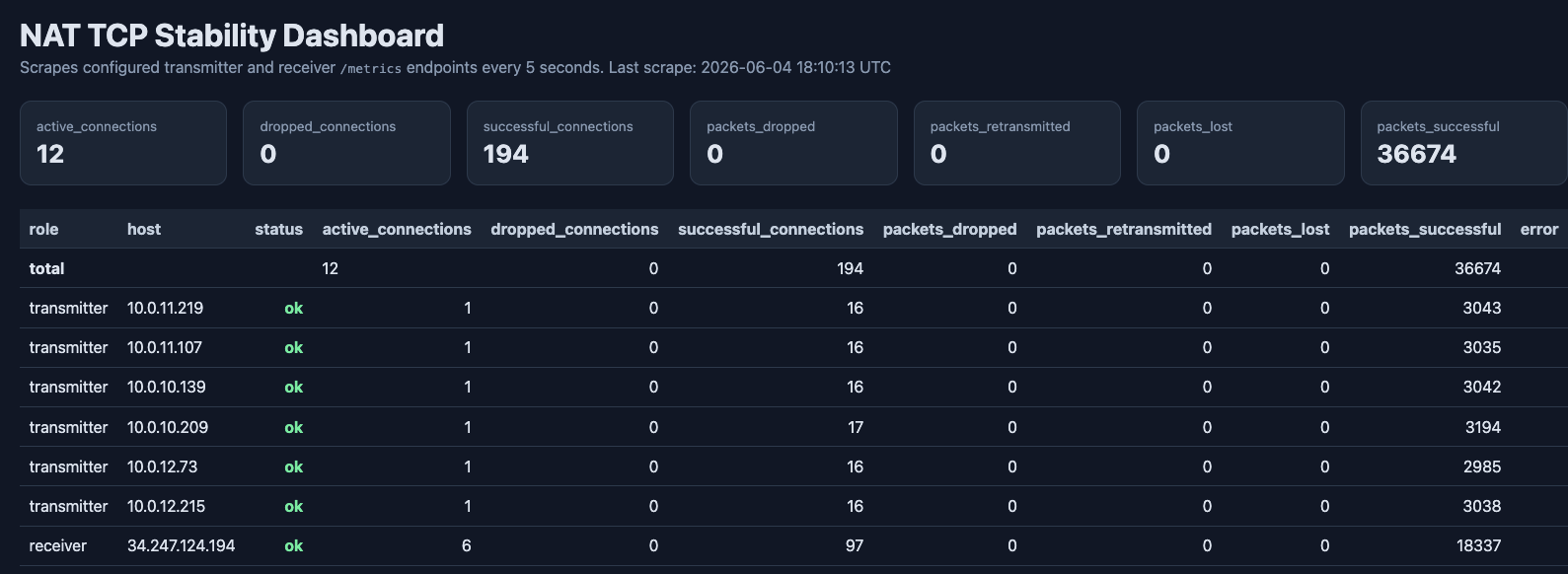
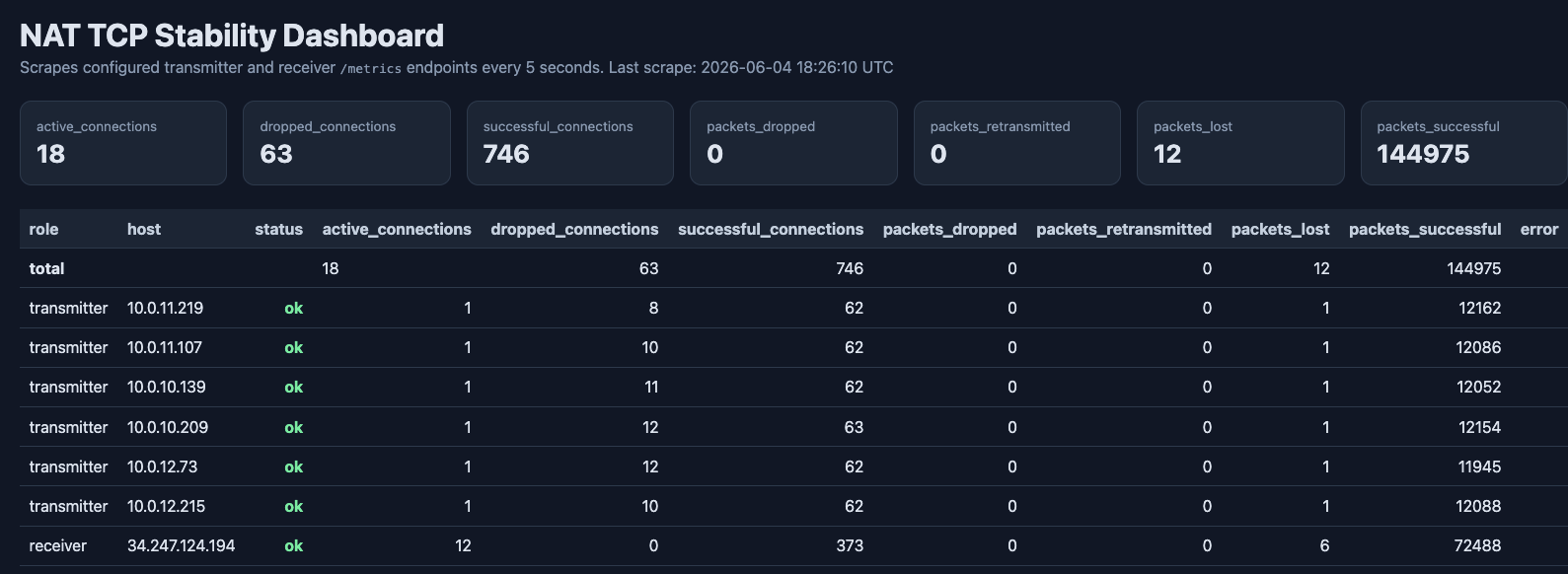
Obviously some connections were dropped but the number is not overwhelmingly large. I would like to now destroy the old NAT Gateway and reassign freed Elastic IP. I will first remove the old NAT definition, apply, and then reassign the Elastic IP.
// --- DELETED BLOCK ---
resource "aws_nat_gateway" "main" {
  allocation_id = aws_eip.nat.id
  subnet_id     = aws_subnet.public[0].id
  tags          = { Name = "NAT-eu-west-1a" }
}
// --- DELETED BLOCK ---
// Applied after deleting to free Elastic IP.
resource "aws_nat_gateway" "regional" {
  vpc_id            = aws_vpc.main.id
  availability_mode = "regional"
  tags              = { Name = "NAT-regional-manual" }

  availability_zone_address {
    allocation_ids    = [aws_eip.nat[0].id]
    availability_zone = local.azs[0]
  }

  availability_zone_address {
    allocation_ids    = [aws_eip.nat[1].id]
    availability_zone = local.azs[1]
  }

  availability_zone_address {
    allocation_ids    = [aws_eip.nat[2].id]
    availability_zone = local.azs[2]
  }
}
This can be also written shorter using Terraform dynamic block so that it's more readable and easy to maintain.
resource "aws_nat_gateway" "regional" {
  vpc_id            = aws_vpc.main.id
  availability_mode = "regional"
  tags              = { Name = "NAT-regional-manual" }

  dynamic "availability_zone_address" {
    for_each = toset(range(local.subnet_count))

    content {
      allocation_ids    = [aws_eip.nat[availability_zone_address.value].id]
      availability_zone = local.azs[availability_zone_address.value]
    }
  }
}
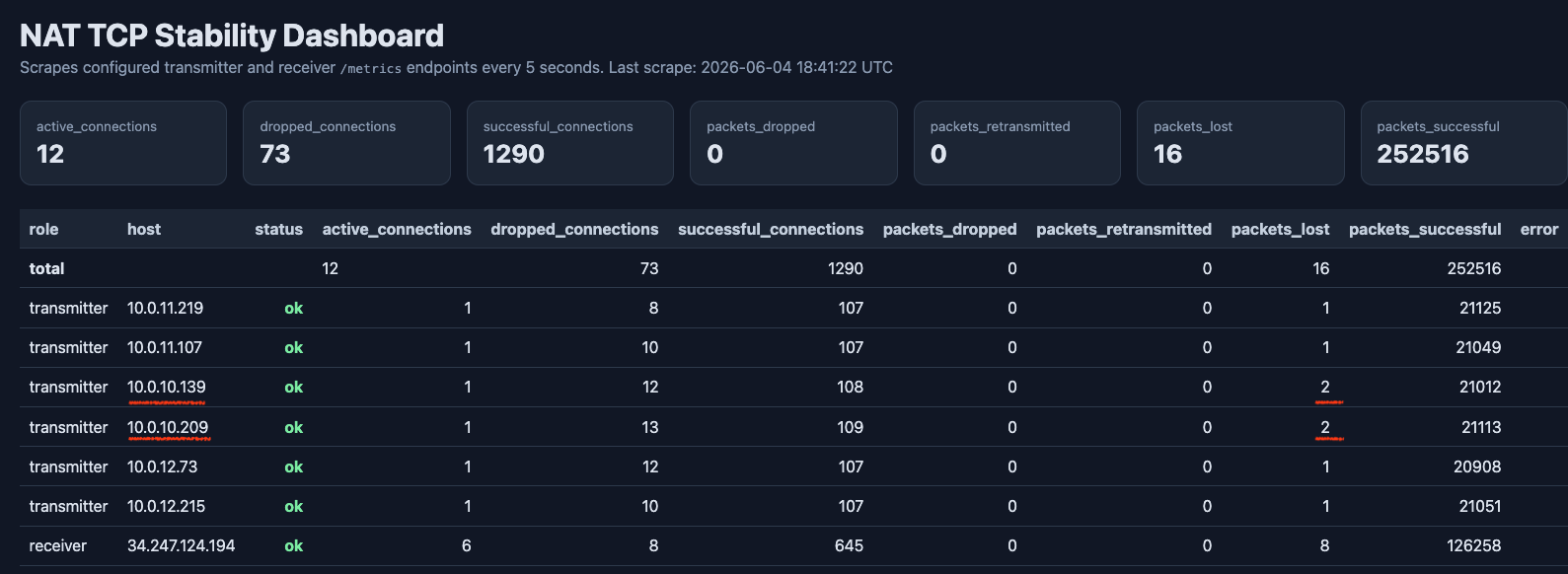
Caution! This operation can take a veeery long time as AWS claims that regional NAT gateway expansion can take up to 20 minutes. So it's a pretty ridiculous fact that creating a new gateway with these two IPs was faster than adding a new IP to it. Anyway, I looked at the dashboard and indeed more connections were dropped, exactly in the AZ we were expanding to.
Conclusion 🎲
As you can see in each of the configurations, there are pros and cons. The 3-NAT setup requires configuration of multiple route tables, if some routes were manually created, they have to be also replicated to new route tables before moving the subnets to them. However, if you need control over static IPs, the amount of steps here is the smallest.
With Regional NAT in auto-mode you lose the ability to control what IPs your workloads will use to the outside Internet. It is the most straightforward config and has the benefit of automatic scaling.
Regional NAT in manual mode allows you to control the IPs with less route table changes or creation. However, to retain the original IP, more steps are necessary and there's slightly more disruption.
In either case, the dropped connections and potential downtime is minimal. Any connectivity to your application through any Elastic Load Balancer, or that goes through VPC Endpoints, VPC Peerings or is local (like to RDS) is unaffected. However, while researching this topic, and reading about scaling up of the NAT when the ports are exhausted, I wanted to check how resilient is the regional NAT in auto-mode and manual regional/zonal NATs with multiple Elastic IPs attached. This could be another post for another day 😉.